Sound Pack Creation Guide (English)
Re-voice the game with your own audio: scene BGM, event jingles, and sound effects. A sound pack is one .essnd file; packs can replace *everything* or just a single sound — every slot you don't include keeps its normal sound.
*(日本語版はこちら → SOUND_GUIDE.ja.md)*
1. How packs work
- A pack is a zip renamed to
.essndcontaining ogg or wav files whose path is their meaning: a file atbgm/map.oggreplaces the normal map BGM. (A flat file namedbgm.map.oggworks too.) - Packs are local: they change what *you* hear. Other players are unaffected; replays and spectating use *your* packs.
- You can enable several packs at once and order them (Settings → Music tab →Sound packs). For each slot the topmost pack that provides it wins; anything nobody provides falls back to the built-in sound. Mixing a "BGM" pack with an "SE" pack just works.
- Priority note: a board that authors its own music, and any per-slot track you assigned in Music settings, both play *over* your packs. A pack is your default soundtrack, not an override of board content.
- Anything missing, oversized, or broken simply falls back — a pack can never break the game or silence a match.
2. Quick start
- Create a folder
user://sounds/dev/MyPack/. On Windows that is%APPDATA%\EpochStreet\sounds\dev\MyPack\. - Put a
manifest.jsonin it:
{ "format": 1, "name": "MyPack", "author": "you", "version": "1.0" }- Add sounds using the paths from the table below (start with one — e.g.
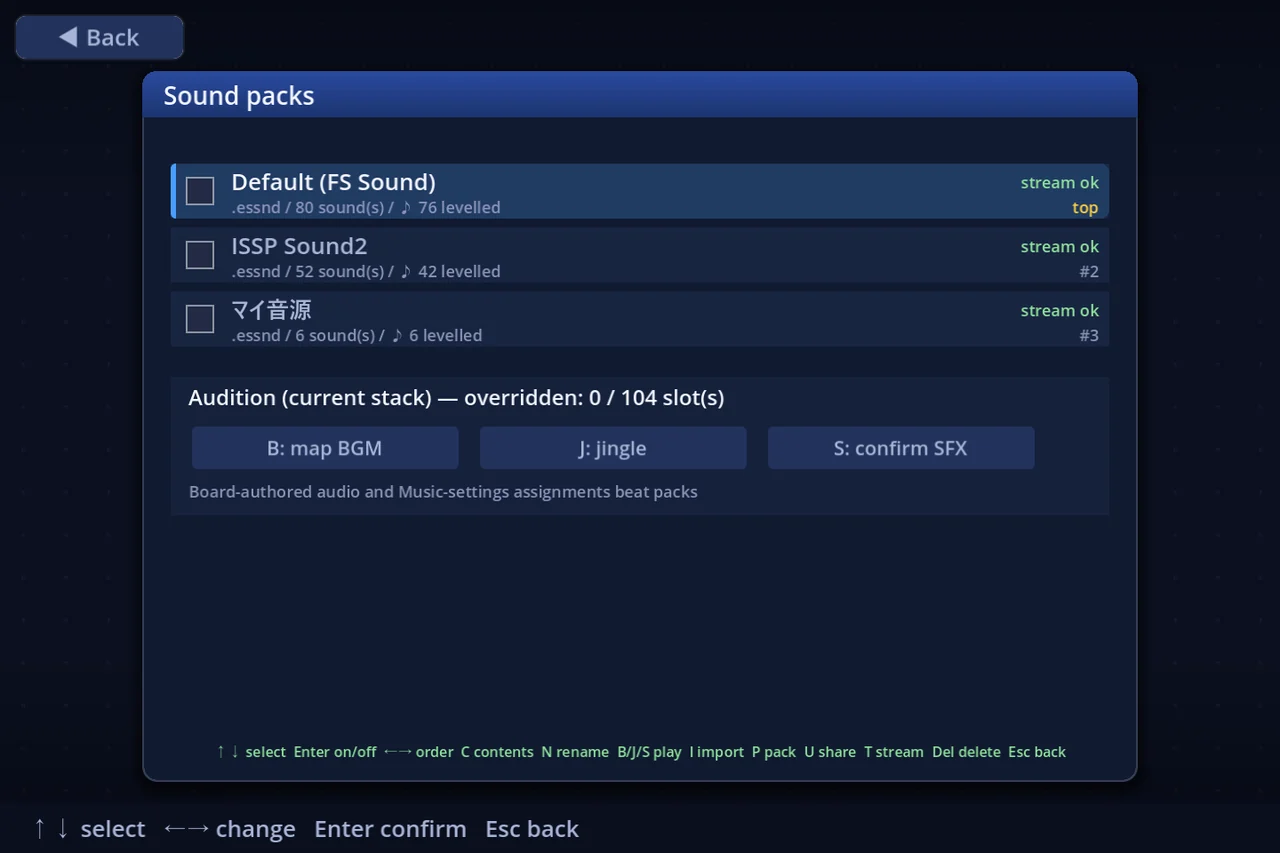
se/confirm.ogg). - In-game: enable the pack in Settings → Music → Sound packs (Enter toggles,←→ moves priority). Press F5 any time to hear your latest saved edits. B / J / S on that screen audition a BGM, a jingle and an SE through the real playback chain.
- When happy, press P on your dev-folder row to package it into a shareable
MyPack.essnd(written next to the installed packs inuser://sounds/).
3. Sound paths (the full v1 list)
Formats: ogg (best for BGM — loops seamlessly) or wav. Every BGM loops (user, 2026-08-12): the whole file by default, so author seamless loops — or give the track an intro with the loop points below. Jingles and SEs play once.
Four SEs loop, though — se/dice.ogg (dice rolling), se/slotSpin.ogg (slot reels), se/rouletteSpin.ogg (roulette wheel) and se/cannonFly.ogg (a piece flying from a cannon). Each sounds for as long as the thing is moving and ends the instant it stops (for the cannon, the instant it lands), so author them seamlessly, like a BGM. 0.5–2 s works well; avoid a one-directional rise or fall, which makes every wrap obvious.
Anything that repeats — every BGM and those four SEs — must be an ogg, because a wav wraps with an audible seam: both the game's settings and the board editor import ogg only for those slots (jingles and ordinary SEs still take wav).
Loop points (an attack that plays only once)
Loop positions written into an ogg's Vorbis comments are read and used as-is, for BGM and looping SEs alike. That is how you give a sound an attack at the head and have every wrap return past it.
| Tag | Meaning |
|---|---|
LOOPSTART | Where a wrap returns to. A bare integer is samples (converted with the file's own sample rate); 1.5 or 0:01.500 is seconds |
LOOPLENGTH | Length of the loop region, measured from LOOPSTART |
LOOPEND | End of the loop region (wins over LOOPLENGTH) |
LOOP_START / LOOP_BEGIN / LOOP_LENGTH / LOOP_END mean the same (keys are case-insensitive). A file with no tags loops as a whole, exactly as before.
Writing them (loop from 1.544 s in a 22050 Hz file):
ffmpeg -i in.wav -c:a libvorbis -metadata LOOPSTART=34048 out.oggvorbiscomment -a -t "LOOPSTART=34048" out.oggThree places show what was read: the message right after importing ("loops back to 1.54s"), the ⟲ 1.54s on the track's row on the slot page, and the Debug → Sound audit rows. On a REPEATING slot — every BGM since 2026-08-12, plus the looping SEs — S (audition) loops, so you can hear the wrap; press S again to stop. Jingles and ordinary SEs audition once.
⚠ When LOOPEND / LOOPLENGTH points BEFORE the end of the file, that early wrap is made at frame granularity (~1/60 s). For a sample-exact loop, trim the file after the loop region and write only LOOPSTART.
BGM (looping scene music)
| Path in the pack | Plays |
|---|---|
bgm/title.ogg | Title / menu BGM |
bgm/map.ogg | Map BGM (normal play) |
bgm/reach.ogg | Goal-in-sight BGM (someone reached the target) |
bgm/summon.ogg | Summon-active BGM (guest on the board; opt-in setting). Plays for any guest whose own file below is absent |
bgm/summon/markAngel.ogg | Summon BGM: Mark Angel |
bgm/summon/holidaymon.ogg | Summon BGM: Holidaymon |
bgm/summon/maharaja.ogg | Summon BGM: Maharaja |
bgm/summon/sabotender.ogg | Summon BGM: Cactuar (sphere 16) |
bgm/summon/watabou.ogg | Summon BGM: Watabou (sphere 28) |
bgm/summon/kingSlime.ogg | Summon BGM: King Slime (sphere 48) |
bgm/summon/mandragora.ogg | Summon BGM: Mandragora (sphere 63) |
bgm/summon/torneko.ogg | Summon BGM: Torneko (sphere 78) |
bgm/summon/fatChocobo.ogg | Summon BGM: Fat Chocobo (sphere 93) |
bgm/bank.ogg | Stock-trading BGM |
bgm/chance.ogg | Chance-card BGM |
bgm/auction.ogg | Auction BGM |
bgm/casino/slot.ogg | Casino BGM: Slots |
bgm/casino/hilow.ogg | Casino BGM: High & Low |
bgm/casino/roulette.ogg | Casino BGM: Gappori Roulette |
bgm/casino/scratch.ogg | Casino BGM: Double-Up Scratch |
bgm/casino/panel.ogg | Casino BGM: Lucky Panel |
bgm/casino/number9.ogg | Casino BGM: Number 9 |
bgm/casino/rope.ogg | Casino BGM: Wakuwaku Rope |
bgm/casino/tarot.ogg | Casino BGM: Silver Tarot |
bgm/casino/lraceBet.ogg / lraceRun.ogg | Legacy Race: prediction board / the race |
bgm/casino/mraceBet.ogg / mraceRun.ogg | Modern Race: prediction board / the race |
bgm/results.ogg | Match-end / results BGM |
Jingles (one-shots that pause the BGM, which then resumes)
| Path | Plays on |
|---|---|
jingle/casinoWin.ogg | casino win |
jingle/jackpot.ogg | casino jackpot (slot 777 / max High-Low run) |
jingle/levelup.ogg | level up (salary) |
jingle/buyout5.ogg | 5× buyout |
jingle/monopoly.ogg | area monopoly completed |
jingle/summonAppear.ogg | a summoned character arrives |
jingle/summonLeave.ogg | a summoned character leaves |
jingle/chance13.ogg | Chance card #13 / #103 |
jingle/holiday.ogg | rest / shops-closed effect |
jingle/bankrupt.ogg | bankruptcy |
jingle/lraceStart.ogg / lraceFinish.ogg | Legacy Race start / first finisher |
jingle/mraceStart.ogg / mraceFinish.ogg | Modern Race start / first finisher |
jingle/casinoEnter.ogg | entering the casino (the "this time it is..." plate) |
jingle/jackpot/number9.ogg | Number 9: jackpot (a total of 6, or 22-24) |
Sound effects
| Path | Plays on |
|---|---|
land.ogg | landing — once per square the piece hops onto (board-authorable slot) |
stateChange.ogg | board change — the tiles moving (board-authorable slot) |
stateFace.ogg | board change — the tiles' looks changing: square type, event effect (board-authorable slot) |
cannon.ogg | a cannon FIRES — the launch (board-authorable slot; the flight is se/cannonFly.ogg) |
door.ogg | door (board-authorable slot) |
vehicle.ogg | vehicle (board-authorable slot) |
switch.ogg | switch (board-authorable slot) |
se/cursor.ogg | cursor move |
se/confirm.ogg | confirm |
se/cancel.ogg | cancel |
se/buzzer.ogg | invalid action |
se/dice.ogg / se/diceStop.ogg | dice rolling (loops until the stop sounds) / dice stop |
se/toll.ogg, se/toll2.ogg … se/toll5.ogg | shopping fee paid, five size tiers: ≤10G / ≤99G / ≤999G / ≤4999G / 5000G+ |
se/buy.ogg / se/sell.ogg | shop bought or built / shop sold |
se/zoushi.ogg | capital increase (the 増資 amount is confirmed) |
se/dealDone.ogg | a negotiation settles (a shop swap or sale is agreed — a CPU-to-CPU exchange sounds the same) |
se/mark.ogg | mark collected |
se/markComplete.ogg | the mark that *completes* the set — played instead of se/mark.ogg when the pick-up leaves you able to take a salary |
se/lucky.ogg | lucky-square family |
se/superLucky.ogg | your share rises to 50% or more (super-lucky square, Chance #26 / #118) |
se/warp.ogg | warp |
se/stockUp.ogg / se/stockDown.ogg | stock price up / down (the walk screen) |
se/priceUp.ogg / se/priceDown.ogg | shop price up / down |
se/cardFlip.ogg | card flip |
se/chanceOpen.ogg | the chance panel slides in from the top |
se/chanceBonus.ogg | a flip completes 4+ in a row (row / column / diagonal) — that line spins twice and the bonus is announced |
se/stairs.ogg | going up or down a staircase (one sound for both directions; a separate slot from the door's door.ogg) |
se/slotLever.ogg | the slot lever is pulled — the start of a spin (casino machine and the Chance cards' area slot alike) |
se/slotSpin.ogg / se/rouletteSpin.ogg | slot reels (loops — on the casino machine until the third stop) / roulette wheel (loops until the pocket lands) |
se/slotStop.ogg | a slot reel comes to rest (three times per casino spin, once for an area slot) |
se/casinoLose.ogg | casino loss / dud |
se/raceStart.ogg | race start signal |
se/mraceOpen.ogg, se/mraceMoney.ogg, se/mraceBoost.ogg, se/mraceOut.ogg | Modern Race: box open / box money / speed boost / eliminated |
se/gateUp.ogg | toll-gate fee rises |
se/aucTick.ogg / se/aucEnd.ogg | auction countdown / auction closed |
se/aucBid.ogg | a bid is placed (every raise, by anyone) |
se/shopRankUp.ogg / se/shopRankDown.ogg | a shop's building looks better / worse |
se/cannonFly.ogg | loops while a piece is in the air after a cannon fires, until it lands |
se/cannonLand.ogg | the far end of a cannon flight — the piece touches down (cannon.ogg is the launch) |
Board gimmicks — these only sound on boards that use the mechanic. Since 2026-08-08 these eight are not listed in Music settings or the sound-pack screens: the mechanics are still in development, so the rows appear only while Settings → Other → Developer mode is on. You can still ship them in a pack, and they still play when a board uses the mechanic — only the listing is held back:
| Path | Plays on |
|---|---|
se/gateOpen.ogg | a gate opens and the route beyond it becomes passable |
se/freeze.ogg / se/melt.ogg | a square freezes over / the ice melts away |
se/whirlpool.ogg | a piece is caught by a whirlpool (hazard) |
se/bossShot.ogg | the boss fires |
se/bossStun.ogg / se/bossDown.ogg | the boss flinches / the boss is defeated |
se/floorDrop.ogg | a piece drops to another floor |
se/win/number9.ogg | Number 9: win |
se/win/hilow.ogg / se/jackpot/hilow.ogg / se/lose/hilow.ogg | High&Low: win / jackpot / miss |
se/win/roulette.ogg / se/lose/roulette.ogg | Gappori Roulette: win / miss |
se/win/scratch.ogg / se/lose/scratch.ogg | Double-Up Scratch: win / miss |
se/win/panel.ogg / se/lose/panel.ogg | Lucky Panel: win / miss |
se/win/rope.ogg / se/lose/rope.ogg | Wakuwaku Rope: win / miss |
A per-casino win / jackpot / miss you do not supply falls back to the shared casino win / jackpot / miss sound, so filling one changes that casino only. Number 9's jackpot is the one that is a jingle (table above).
(Every path also accepts .wav. Future game features add new paths to this table; unknown paths in your pack only produce a warning, so packs stay compatible in both directions.)
4. Finding a sound's name
With Debug Mode on, open その他 → デバッグ → サウンド監査 (Sound audit) during a match: it lists every slot the game has requested this session and which layer answered — the board, a Music-settings assignment, your pack (by name), or "default". Trigger a sound, check the list: it's the fastest way to see what's left to cover.
5. Making a pack out of what you already imported
You don't need the dev folder at all if you already imported music the normal way:
- Settings → Music → Music settings, import your files with I and assign them to slots with ←→ (BGM, jingles and sound effects alike).
- Press P. Every assigned imported file is bundled into
user://sounds/My sounds.essnd— a normal pack, ready to enable or share. Pressing P again writesMy sounds-2.essnd; nothing is ever overwritten.
5a. Loading a pack in, then fine-tuning it
On its own a pack is take-it-or-leave-it, and its levels are the author's. When you like a pack but want one of its sounds quieter, load it instead:
- Settings → Music → Music settings, press L.
- The pack list appears. Space ticks a pack (A all, N none). You can tick several.
- Enter → Yes. The ticked packs' sounds are copied into Music settings and assigned slot by slot.
Afterwards they are ordinary imported tracks, so each slot has its own volume (− / +), mute (M) and streaming decision (T) — on the list or on the slot's own page (Enter).
- When several ticked packs carry the same slot, the Settings → Music → Sound packs order decides (top row wins). The number on the left of each row is that priority; reorder it with ←→ on the Sound packs screen.
- Slots no ticked pack covers are left alone — your own imports are never discarded. To land exactly the packs' settings instead, tick the top row, "Revert everything first".
- The level a pack authored for a slot comes across as the track's level, so fine-tuning starts from what the author chose.
- Mutes come back too. A slot that was muted when the pack was made with P loads back muted (lift it any time with
M). Unmuting plays it at its recorded level — a pack cannot remember what the level *behind* a mute was. Every other loaded slot has any previous mute lifted. - P (section 5) is the exact inverse, so you can go round the loop: load, fine-tune, then P to bundle the result as your own pack.
5c. Renaming a pack / seeing what is in it
In Settings → Music → Sound packs, select a pack, then:
- N — rename. Type the new name and press Enter (Esc to cancel). The name is written *into the pack*, so it travels with it: whoever you share it with sees the same name in their list. The file name, the stack position and the on/off switch are all left alone. A downloaded pack keeps its publisher's name and cannot be renamed.
- C — see what is in it. Lists every sound the pack replaces. Enter (or a click) auditions that pack's own audio, at the level the pack author set — even when the pack is switched off or is being beaten by something else. The right-hand column says what a real match would play:
in usemeans you hear it, whilepack off/assignment wins/another pack wins/muted/off streameach name the layer that wins instead. (Board-authored audio outranks them all.)
5b. Music settings, slot by slot
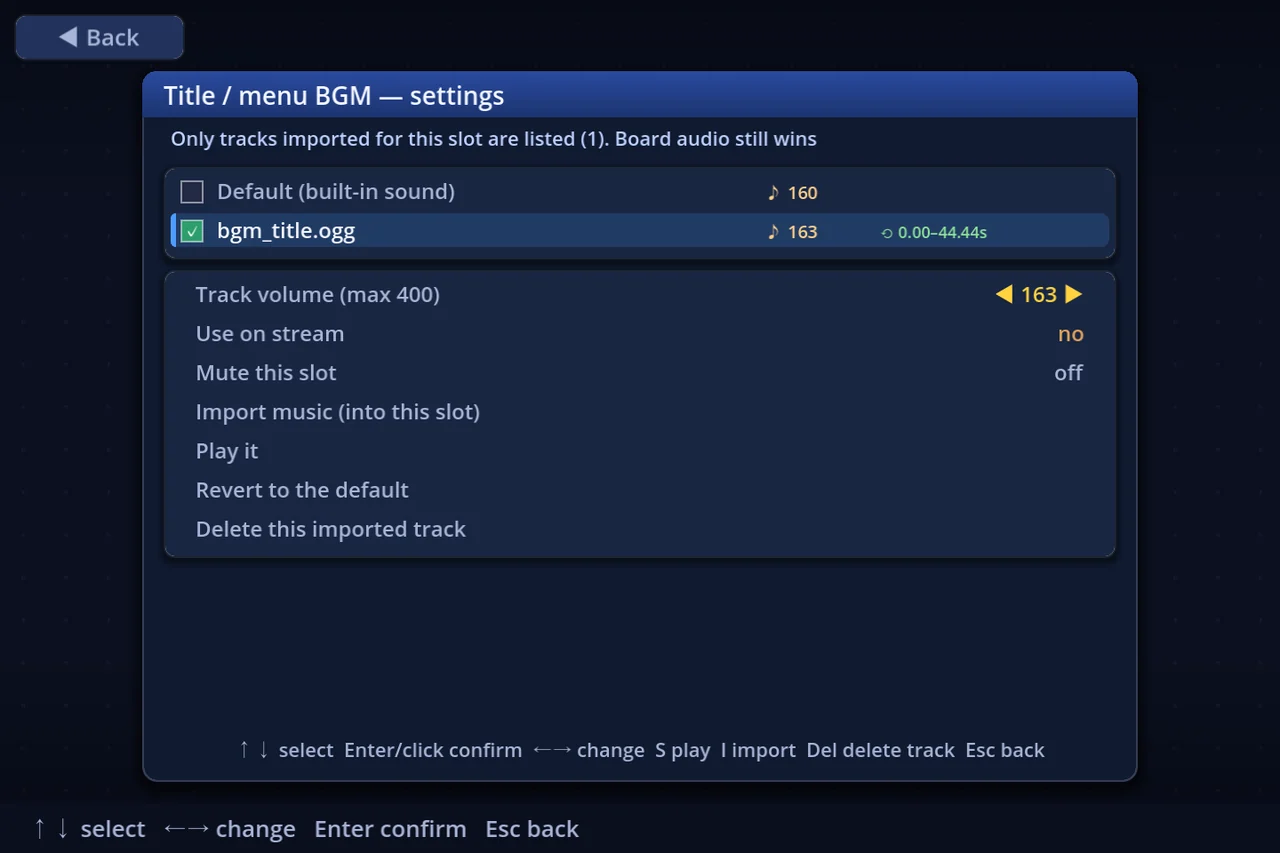
Settings → Music → Music settings lists every slot. Press Enter (or click a row) to open that slot's own page, which holds everything about it: the tracks you imported for it, the assignment, the track's volume, whether it plays in Streamer Mode, mute, import, and audition. S auditions from either screen.
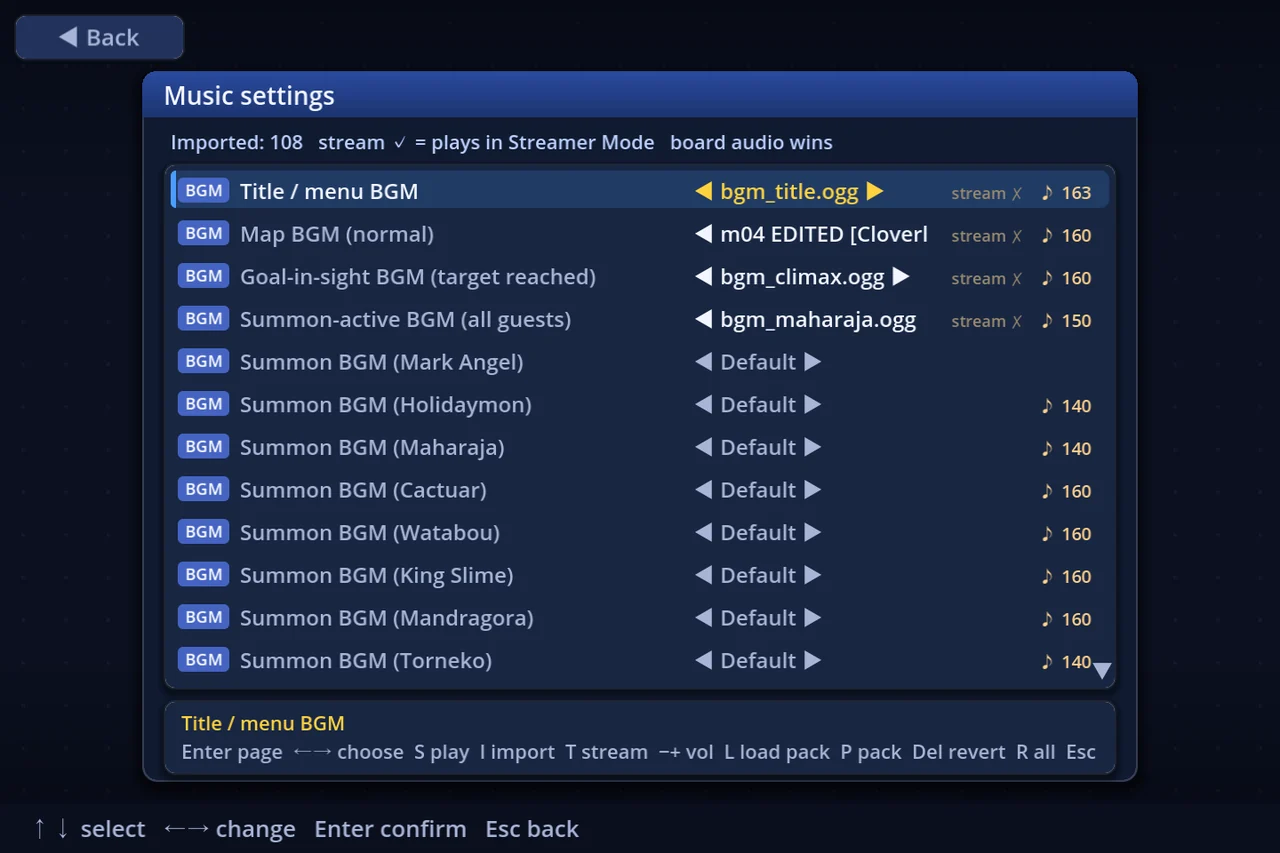
Imported files belong to the slot you imported them under: a file imported on Title / menu BGM is offered on that row only, so a big library never buries the few tracks meant for the slot you are editing. Import the same file again on another slot and it is offered on *both* — the list shows +N more — and nowhere else. Anything imported before this feature existed has no recorded slot and is offered everywhere.
The page also deletes an imported track — the *Delete this imported track* row, or the Delete key. It removes the file itself, so a shared track leaves every other slot as well; the confirm says so before you commit, and starts on *No*.
Both screens work fully by mouse: hover highlights, click does what Enter does.
5e. Per-sound volume
Some sources are simply louder than others. Instead of asking every listener to ride the master volume, a sound can carry its own level, 0–400 (100 = play it as recorded). Above 100 the sound is amplified — that is the fix for a source that was simply recorded too quietly (200 is about ×4 amplitude, +12 dB; the 400 ceiling is ×16, +24 dB).
Five ways to set it:
- In the file name. A file imported as
song.50.wavcomes in at volume 100 — the.50right before the extension is read as the level and doubled, so.60is 120,.100is 200, and.200reaches the 400 ceiling. The library then shows it assong.wav: the number was an instruction, not part of the title. Only0–200counts as a number;song.201.wavorsong.5x.wavare just names, and a bare50.wav(nothing before the number) is a name too. - In a pack, the same way. The convention works on pack entries too, so a dev folder needs no manifest for this: name a file
bgm/map.30.oggand the map BGM plays at 60 (twice the 30 you wrote). The suffix is not part of the slot —bgm/map.50.oggandbgm/map.oggare the same slot, one levelled and one not. Slot names that merely end in a digit (se/toll2.ogg,bgm/casino/number9.ogg) are untouched. - In
manifest.json. Add avolumemap for exact control:
{ "format": 1, "name": "MyPack", "volume": { "bgm.map": 50, "se.confirm": 80 } }A manifest entry beats the file name for the same slot — it is the more deliberate statement of the two.
- In Music settings. With an imported track on the row, − and + move its level one step at a time (the slot page's *Track volume* row takes ←→ at the same step of 1). The row shows
♪ NNwhenever a track is not at 100. - In the Board Editor. Audio imported into a board carries the level that board plays it at — the Volume field in *Assets* and in *Sound (BGM / jingles / SE)* (0–400, step 1). ♪ Preview plays at exactly that level, so you can check it by ear without leaving the editor, and the number ships inside the board file so every player hears the same balance.
The Sound packs screen shows ♪ N levelled on any pack that carries levels.
A slot you muted packs at volume 0 — silence is what you had, so silence is what a receiver gets; the sound is still bundled, so they can turn it back up.
The level belongs to the track, not to the slot, so it applies everywhere that track is assigned — and it is what P writes into the pack. Enable a pack you received and its sounds play at the levels its author chose; nobody has to be told "turn track 3 down". Packs made before this existed play exactly as they always did.
5f. Theme songs (yours, and your character's)
Settings → Music → Theme songs. Four moments can carry the music of whoever the moment is about:
| Moment | Whose music |
|---|---|
| Level up (salary) | the seat that took the salary |
| Goal-in-sight BGM | the seat that reached the target |
| Match-end / results BGM | the winner |
| Bankruptcy | the seat that went bankrupt |
- Two homes. Your ACCOUNT theme (this screen — one per profile) and a PIECE's theme (
Ton the piece settings screen, for imported pieces). A piece's theme is not inside the.espiece: that keeps the character's identity hash still, and it lets a theme travel without the character. - Priority is the two rows on Settings → Music. Defaults: BGM = Board > Player > Piece, jingles = Player > Piece > Board. An empty rung is skipped, so filling one moment only is perfectly normal.
- Credits are written per sound (title / source in both languages, author, notes, rights note, volume, loop start) and appear in the in-match Data → Music list, along with whose theme it was.
- Limits: 3 MB per BGM, 1 MB per jingle, 8 MB per set. The two looping moments (goal-in-sight, results) take ogg only — a wav has an audible seam at every wrap.
- Netplay: publish it and the people in your room fetch it automatically (they can turn that off). An unpublished theme is never announced, because nobody could fetch it. Fetching runs in the background and never holds up the match.
- Streamer Mode: like every import, the default is "not used on stream", and the rows live under Settings → Display → Assets for streaming. Leaving one off never means silence — the next rung (the board's music, or the built-in default) plays instead.
5d. Per-board music (playlists)
You can pick a handful of tracks for one board and have the game shuffle them — the gesture Smash Ultimate's "My Music" gives you before a stage. No board editing, and nothing about someone else's board is changed.
Three ways in, one screen
Mon the board list — choose this board's music before you enter it (the main one)- Settings → Music → Per-board music — pick the board first
- In a match: Other → This board's music — decide while looking at the board; applies at once
Using it
◀▶switches scene (Map / Goal near / Summon)Enteron a track adds or removes it (Spreview,Iimport — ogg only,Delclear all)- The first row is Track changes (track-by-track / one per match) — the same setting the Music tab holds
Rules
- Two or more tracks shuffle. "Track by track" plays one to its end and draws the next; "one per match" draws a single track for the whole match and loops it (an ogg's own
LOOPSTARTis honored there). - One track behaves exactly like an ordinary assignment (it loops).
- Whether the playlist beats the board's OWN music is Settings → Music → Playlist vs board music:
- Auto (default) = the board wins while Streamer Mode is off, the playlist wins while it is on
- or say it outright: Board wins / Playlist wins
- A track marked "don't use on stream" is skipped by the shuffle while Streamer Mode is on (never silence); if every ticked track is skipped, the usual sound comes back. A track whose file is gone is skipped the same way.
- A playlist is local to this machine: never shared, never uploaded, and a replay or a spectator hears the viewer's music. ♪n on a board-list row is how many tracks that board carries.
6. Import, upload, download
- Import a pack you received: drag the
.essndonto the game window (main menu), or Settings → Music → Sound packs → I. It appears in the list (disabled until you enable it). - Upload (share your pack): select it on the Sound packs screen and press U.
- With a content server configured, the pack is published to it (it re-runs the same validation and applies its upload quotas), and others find it in the Content screen under the *Sound packs* filter — rows are badged
[sound]. - With no server configured, the same package is written to
user://sounds/share/pkg.snd.<id>.espkg; send that file to anyone, they install it from the Content screen (or you both use the local mock server folder). - Download: install it from the Content screen like any other content. It then appears in your Sound packs list as a downloaded row and behaves like any pack (enable, priority, audition).
- One caveat for sharing: a *shared* package allows up to 8 MB per sound file (the content-pipeline cap) where a local
.essndallows 16 MB. If an upload is refused, the message names the file to shrink. - Content rules: only audio you have the right to share; nothing offensive.
7. Streamer Mode
If you stream, Settings → Display → Streamer-Mode assets decides, per asset, what may be heard on stream. Imported music and sound packs start as "off stream" — while Streamer Mode is ON they are replaced by the built-in sounds until you allow them (press T on the row, or A to allow a whole group). The Sound packs screen shows stream ok / off stream per pack.
The Music settings rows show it too (2026-08-02): a row with a track assigned carries stream ✓ (it plays in Streamer Mode) or stream ✗ (it is replaced by the built-in sound). That badge is visible whether or not Streamer Mode is on, so the whole list can be checked before you go live. While Streamer Mode IS on, a track actually being replaced right now upgrades to the stronger *default on stream*. T on the row flips the decision without leaving the screen.
8. Limits (checked on import/publish)
| Limit | Value |
|---|---|
| Pack file size | up to 64 MB |
| Single sound file | up to 16 MB |
| Files per pack | up to 200 |
| Formats | ogg, wav |
| Name | up to 24 characters |
A failed import lists exactly which rule was broken and for which file.
9. Tips
- BGM loops the *whole file* — trim silence off both ends and check the seam with the B audition key before polishing.
- Keep SEs short and punchy; they layer over the BGM.
- Match your loudness across the pack — the game applies the user's BGM/SE volume settings but does not normalize your files.
- Keep your dev folder under version control if the pack grows — a pack is just files.