Custom Piece Creation & Import Guide (English)
Make your own game piece — a character, an animal, anything — and play as it instead of the built-in circle, triangle, square, diamond, or star. A piece can be animated, is saved as a single shareable file, and carries one colour that is yours.
*(日本語版はこちら → PIECE_GUIDE.ja.md)*
What works today vs. coming soon. You can now make a piece inside the game with the Piece / Texture Studio (§2b, added 2026-08-19) or in an external tool and import it (§2/§3). The online gallery upload/download is still on the way — where this guide says *(coming soon)*, that part isn't in the game yet.
1. Where pieces live, and the keys you'll use
All custom pieces are files in your pieces folder: user://pieces/ (on Windows this is %APPDATA%\EpochStreet\pieces\).
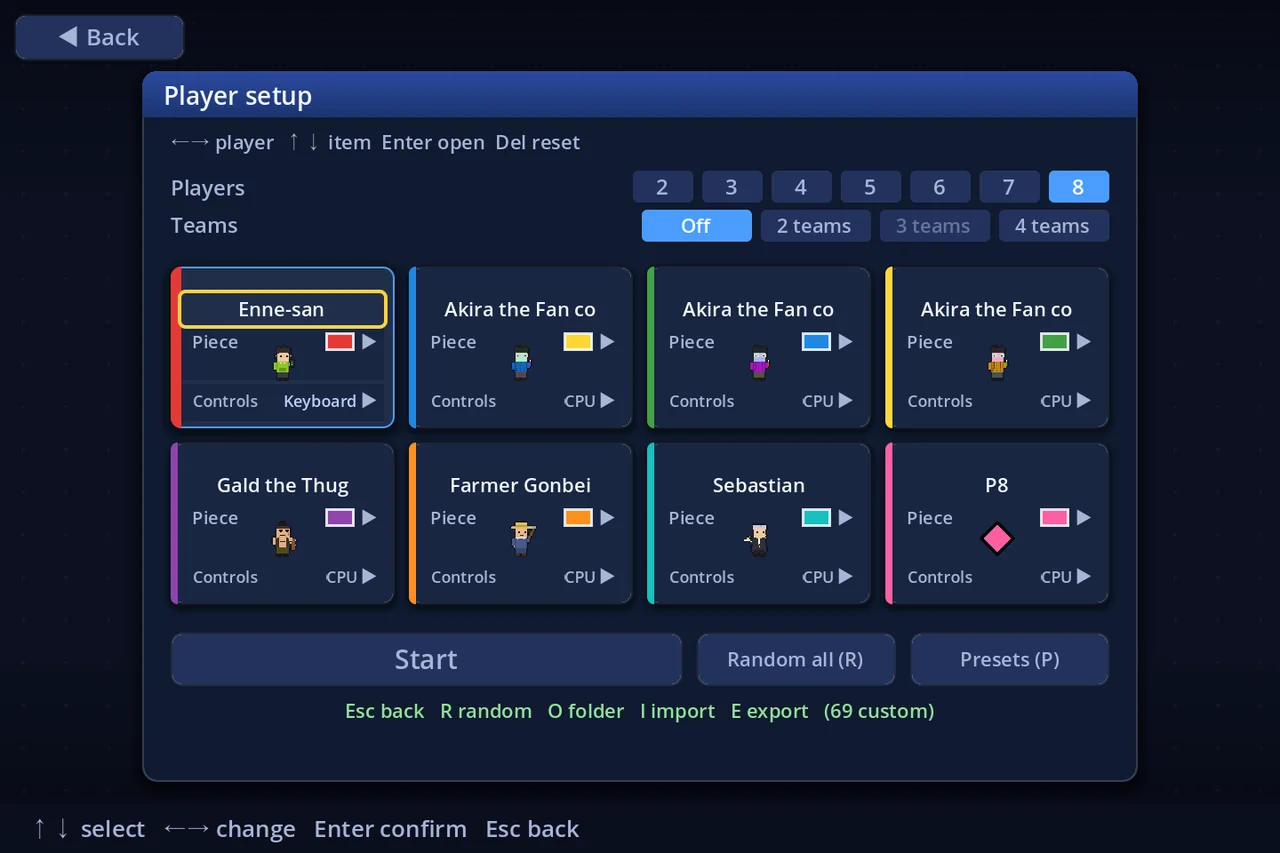
Everything is done from the Player Setup screen (Main menu → play locally → the seat list). With that screen open:
| Key | Does |
|---|---|
| I | Import a piece — pick an .espiece file, or any image (see §2/§3) |
| E | Export / reveal the selected seat's piece file, to share it |
| O | Open the pieces folder (drop files in here, then it rescans) |
| H | Hide custom art — show every custom piece as a plain shape instead |
| Enter | On a seat's piece field: open the piece list (name + description; on a CPU seat, AI characters are listed first). On the colour swatch: open the colour list |
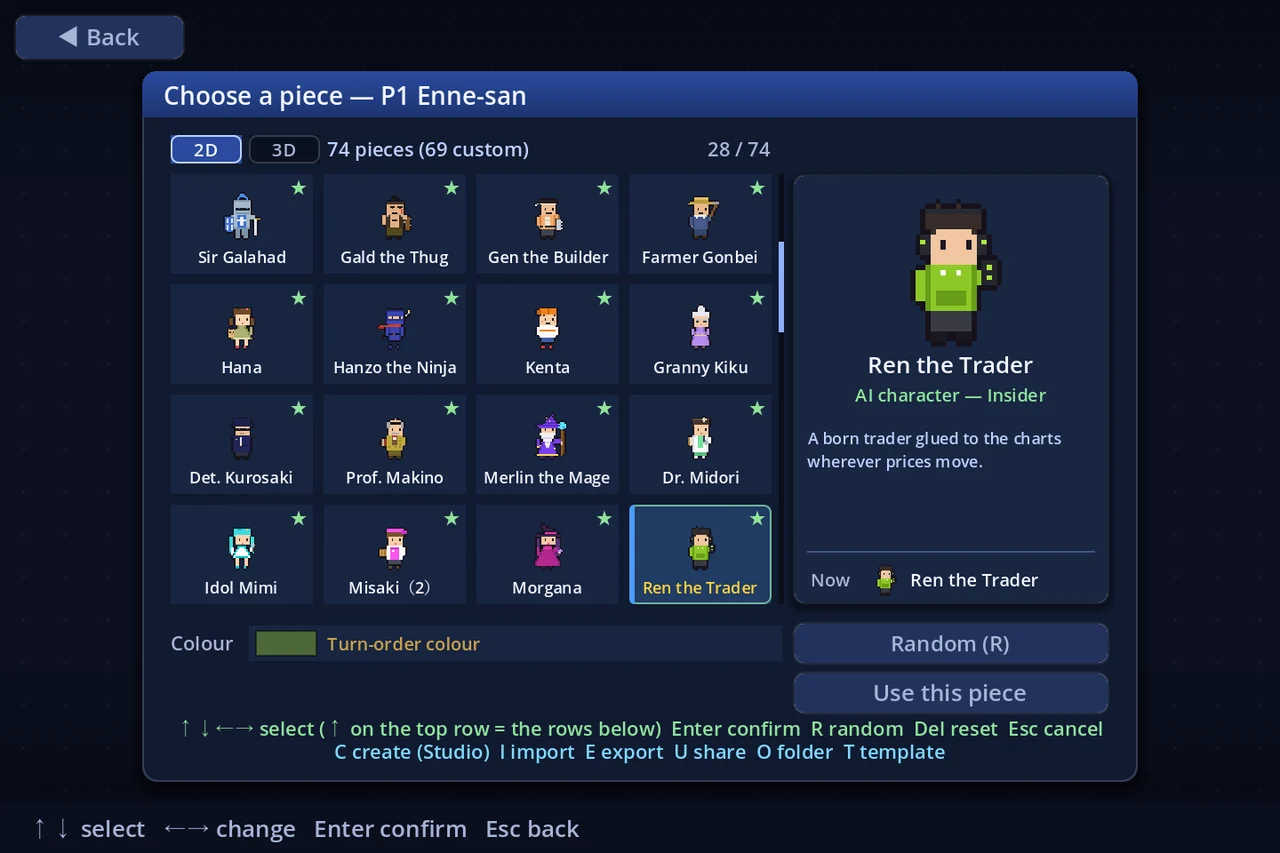
To use a piece: import it, then press Enter on a seat's piece field and pick it from the list. Your choice is remembered per seat. In ひとりであそぶ free play, an "opponents" screen after the map choice lets you pick each CPU's piece/AI character and its strength (つよさ 1–5) the same way.
2. The quickest piece: import any image
- Have any image ready — a PNG, JPG, WebP, or BMP (a character, a logo, a photo…).
- Player Setup → press I → choose the image.
- The game turns it into a piece automatically: it is scaled to a square frame, given a name (the filename) and an identity colour picked from the image's average colour.
- Press Enter on the seat's piece field and pick it from the list. Done — you're playing as your image.
This makes a still piece (one idle frame). For a piece that animates, use the Piece / Texture Studio (§2b) or author an .espiece yourself (§3).
2b. Make one inside the game — the Piece / Texture Studio (コマ/テクスチャ工房)
Since 2026-08-19 you can build a piece without any other software — no image editor, no text editor, no zip tool. Open the Studio from:
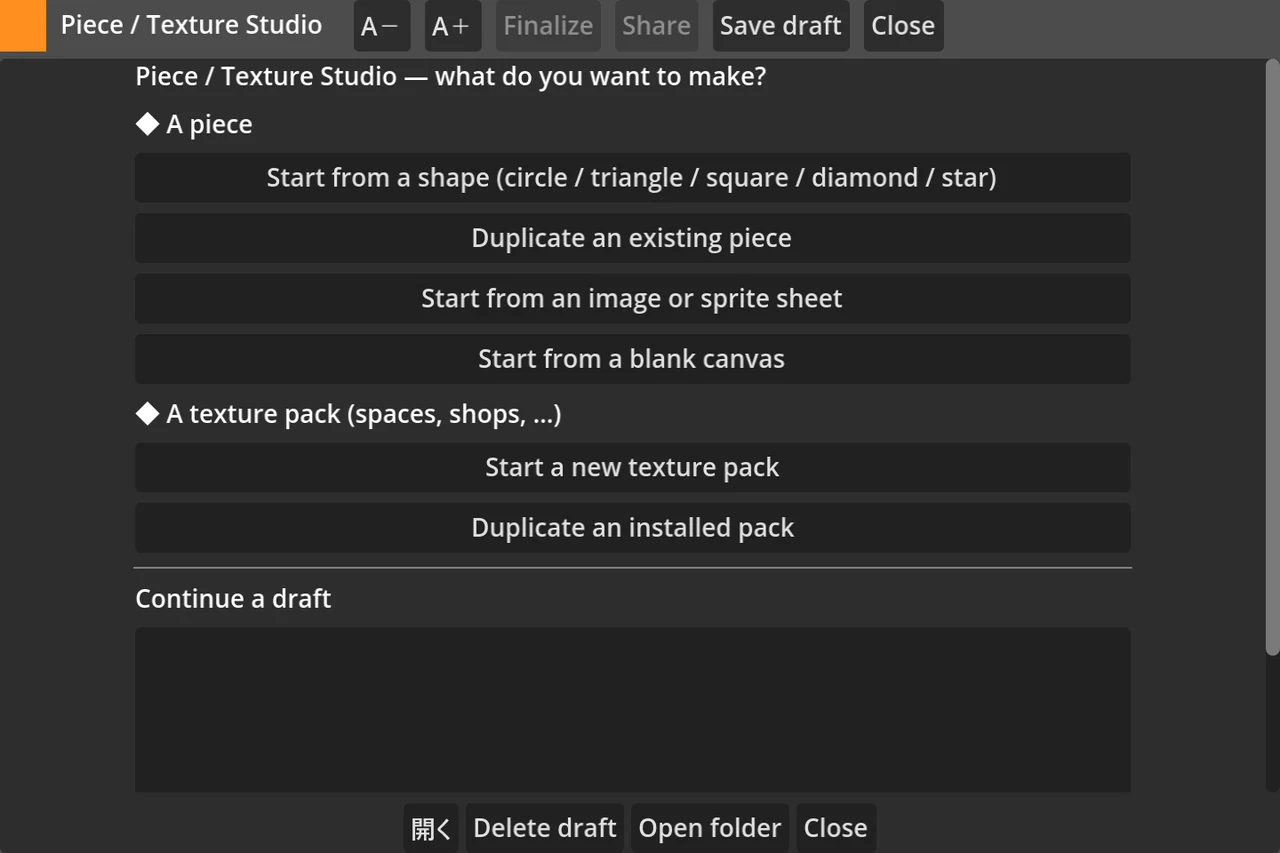
- the piece list (Player Setup → Enter on a seat's piece field) with C, or
- Main menu → コマ/テクスチャ工房 / Piece / Texture Studio.
*(While the feature is being finished the Studio is shown with Test Mode on (Settings → Other → Test mode; it moved off Developer Mode on 2026-08-20). If you do not see it, keep using §2/§3 — nothing about the file format has changed.)*
Where do you start? The Studio opens on four doors, so you never face a blank page:
| Door | What it does |
|---|---|
| Start from a shape | A circle / triangle / square / diamond / star silhouette in the colour you pick |
| Duplicate an existing piece | Copies any piece in your list into a new draft (the original is never changed) |
| From an image or sprite sheet | Reads your PNG: you declare the cell size, the game maps rows to states and finds the frames. It also offers to make a one-colour background transparent |
| Blank canvas | Exactly that |
The four tabs
- えがく / Draw — pen, eraser, fill, eyedropper, line, rectangle, ellipse, mirror-X, flip, clear; 1–16× zoom (mouse wheel), middle-drag to pan, right-click erases, onion skin, and a 1× swatch in the corner so you always see the real board size. The frame strip under the canvas adds / removes / reorders frames. Ctrl+Z undoes (50 steps).
- うごき / Motion — per-state frames and fps with live playback, and a preview of the piece walking on a board tile at 1×. States you never draw simply fall back to
idle, exactly as in the file format. - なまえ / Details — name / English name / author / description / English description, the job class (§3b — for Sphere Battle; it does nothing yet), the identity colour (with a live warning if it is too dark or too close to another piece's colour), the cell size (changing it rescales your art) and the feet offset. No JSON anywhere — there is a read-only "view the JSON" button if you want to learn the format.
- AI — the optional personality (§8): all six archetypes with a line of description each, the tendency sliders, the build preferences and the default strength. Try it out hands the draft to a CPU in a short match on the smallest board; the pause menu brings you straight back.
Drafts and finishing. Work in progress is saved as a plain folder under user://pieces/drafts/<name>/ — sheet.png + manifest.json you can open in any other tool (edit sheet.png outside and the Studio offers to reload it). Press 完成させる / Finalize and the game writes a real .espiece into your pieces folder. The 検証 strip in the header shows, all the time, whether the piece is within the §6 limits — finalize stays disabled until it is, and says which rule is in the way.
Finalizing always makes a new piece: the name and colour are part of a piece's identity (§4), so editing a finished piece starts a fresh draft rather than changing the original in place.
3. An animated piece: author an .espiece
An .espiece is just a ZIP file containing two things, renamed to end in .espiece:
manifest.json     ← text: the piece's settings
sheet.png         ← image: the animation frames
3a. Draw the sheet (sheet.png)
Use any pixel-art tool (Aseprite, Piskel, GIMP, Photoshop…). One PNG holds every frame:
- Every frame is a square cell of the same size: 16, 24, 32, 48, 64, 96, or 128 px (32 is a good default). Pieces are drawn *small* on the board — keep shapes bold, simple, high-contrast.
- 32 is the pixel-art default. A board token is drawn into about 25 board pixels, and the board is then scaled by the zoom (up to 3.2×) and again by the window stretch (2.25×at 1080p, 4.5× at 4K) — so one of your pixels reaches the player as a 3–11 px block. That chunkiness is the look, not a defect.
- Go to 64 or above if you want smooth art. 64 is where the blocks stop reading at 1080p, 96 reaches 1:1 at the default zoom, and 128 is the ceiling (still under 3× at 4K maximum zoom). Nothing larger is offered: it would be minified in every configuration the game actually runs in.
- A bigger cell is not free. Pixels per frame grow with the SQUARE of the cell (1,024 at 32 px, 16,384 at 128), so a full 6-state × 8-frame piece costs that much more to draw— and the game keeps every installed piece resident as a texture from startup.
- One row per animation state, frames left → right. Row order, top to bottom:
idle, walk, hop, joy, sad, win. Only include the rows you actually drew (idlefirst). - Draw your character facing right — the game flips it automatically when it walks left.
- Leave unused cells fully transparent.
Example: a 32 px piece with 4 idle frames and 6 walk frames → the PNG is 192 px wide (6 cells × 32) and 64 px tall (2 rows).
3b. Write the settings (manifest.json)
A plain-text file. Copy this template (there's a ready copy in docs/piece-template/):
{
  "format": 1,
  "name": "My Piece",
  "nameEn": "My Piece",
  "author": "you",
  "desc": "One line about this piece.",
  "descEn": "One line about this piece, in English.",
  "job": "hero",
  "color": "#ff8f1f",
  "cell": 32,
  "yOffset": 0,
  "states": {
    "idle": { "row": 0, "frames": 4, "fps": 6 },
    "walk": { "row": 1, "frames": 6, "fps": 10 }
  }
}name— the piece's name (≤ 16 characters). Shown in the piece list — and if a CPU plays with your piece, the CPU is *called* this (see §4).nameEn— optional English name (≤ 16 characters), shown while the game is set to English. Leave it out and thenameabove is shown in both languages.author— optional, ≤ 24 characters.desc— optional one-liner (≤ 128 characters), shown under the name in piece lists.descEn— optional English description (≤ 128 characters), same rules asdesc.job— optional job class for the character, one ofwarriormerchantmageclericthiefdancerherosagefreelancer. It is the class the character *is* —Sphere Battle will use it as the seat's starting class when that mode ships. It does nothing in a match today, and it is here now on purpose: a piece's identity is the hash of its file, so adding a job to an already-published character later mints a *different* piece and has to be published again. Leave it out and the character simply states no job.color— your identity colour as#rrggbb(see §4). Required. Not near-black.cell— the frame size you drew (16 / 24 / 32 / 48 / 64 / 96 / 128).yOffset— nudge the art up/down for foot alignment, −8…8 (usually 0). The budget widens to a quarter of the cell on the larger sizes (±12 at 48, ±32 at 128): the nudge is counted in sheet pixels, so a fixed cap would shrink the distance you can actually move the character as soon as you drew it at a higher resolution.states— one entry per row you drew. Keys must be lowercase and from the list above;idleis required.rowis the row number (top = 0),frameshow many cells that row uses (1–8),fpsits speed (1–12). States you leave out just showidle.ai— optional: give the piece an AI personality so it can be picked as a CPU opponent. Full guide in §8.
3c. Import it (since 2026-09-02 there are three ways)
The shortest is to import the folder as it is.
- A. The folder as-is — put
manifest.jsonandsheet.pngin one folder, then in the game:コマをえらぶ (piece picker) → I → choose thatmanifest.json. No compressing, no renaming. Draggingmanifest.jsononto the game window does the same thing. - B. A plain
.zip— select both files (not the folder that holds them) → compress to a.zip→ drag the.ziponto the game window. You no longer have to rename it to.espiece: the game reads what is inside and works out whether it is a piece, a texture pack or a sound pack. - C. The old way — rename the
.ziptoMyPiece.espieceand pick it with I.
Whichever you use, if something is wrong the game names the rule that failed *and what to change*; fix it and import again.
Want a starting point? Press T on コマをえらぶ and the game writes a starter kit to
user://pieces/_template/— tracing underlays at all four cell sizes, blank sheets, amanifest.json, the AI variant, a quick reference and a copy of this guide — then opens the folder.
4. The name and the identity colour (important!)
The name. Every custom piece has its own name (name, ≤ 16 characters), shown in the piece lists. Two rules worth knowing:
- A CPU playing with your piece plays *under the piece's name* — the sidebar, results and replays all call that player by the piece, and the name field on Player Setup becomes read-only for that seat (change the piece to change the name). Your own seat is different: a human always keeps their freely set player name, whatever piece they use.
- Give the piece an English name (
nameEn) and the game shows it — and calls the CPU by it — while it runs in English; without one, the Japanesenameis used in both languages.descEndoes the same for the description. - Names can't be edited after the fact (they're baked into the piece's identity, like the colour). If two pieces in your folder share a name, the lists show the second one as "Name (2)", "Name (3)"… (the check runs on the name as displayed in your current language).
- Importing a piece whose name you already have asks what to do (2026-08-30). Edited your piece and imported it again? Choose Replace — the older file is deleted and anything using it (seats, player presets, the Streamer-Mode "show this" flag) moves to the new version. If somebody else simply picked the same name, choose Keep both and the lists go on showing "Name (2)" as before. Cancel imports nothing.
- Not carried over: save files and replays. Those are records of a match played with the old piece, so they are left exactly as they are.
- Bundled pieces, downloaded pieces and legacy images can't be replaced — you get the old "Name (2)" behaviour there. Remove a downloaded piece from Settings → Other → Delete imported items instead.
The colour. Every custom piece has exactly one colour, fixed when the piece is made, that can never change. It is used everywhere the game shows "your colour": your side-panel card, minimap pin, stock-table column, and movement arrows.
- For an imported image (§2) the colour is taken from the image automatically.
- For an authored
.espiece(§3) you set it withcolor. Want a different colour later? Make a new piece with a newcolor— the colour is baked into the piece's identity. - Near-black is not allowed (it's the outline colour — the piece would vanish).
- If two players at the same table pick pieces whose colours are too similar, the game asks the later chooser to pick a different piece before the match can start. The built-in shapes (which can take any palette colour) are always available as a fallback. The colour swatch of a custom piece shows a locked ring — cycling the colour does nothing for it.
5. Animation states
Only idle is required; every state you skip simply shows idle instead.
| State | Plays when… | Suggested frames |
|---|---|---|
idle | standing on a square (and as every fallback) — required | 2–4 |
walk | moving between squares (auto-flipped left — draw facing right) | 4–6 |
hop | the little jump of each step | 2–3 |
joy | good things: salary, big income, prizes. On the podium: 2nd place (and 3rd, in games of 5 or more) | 3–4 |
sad | paying a big toll, going bankrupt. On the podium: last place, and anyone who went bankrupt | 3–4 |
win | you won — the podium's 1st block | 4–6 |
The podium is where these get seen. When a match ends, every player strikes a pose on the results screen, decided by where they finished:
| Finished | Pose |
|---|---|
| 1st | win |
| 2nd | joy |
| 3rd, in games of 5 players or more | joy |
| last | sad — in a 2-player game that is 2nd place |
| anyone who went bankrupt, wherever they placed | sad |
| everyone else | idle |
*(In play the game also uses idle and walk; hop is read from your file and will animate as that moment gets wired up. Skipping a state is always safe — it simply shows idle, which is the same pose the middle of the field gets on the podium anyway.)*
6. Limits (checked automatically on import)
| Limit | Value |
|---|---|
| File size | 1 MB per sheet (each alternate skin adds another 1 MB of budget — §6b) |
| Sheet size | up to 1024 × 1024 px |
| Cell (frame) size | 16 / 24 / 32 / 48 / 64 / 96 / 128 px square |
| Frames per state | 1–8 |
| Animation speed | 1–12 fps |
| Name | up to 16 characters |
| Colour | #rrggbb, not near-black |
desc (optional) | up to 128 characters (descEn the same, budgeted separately) — shown under the name in piece lists |
job (optional) | one of warrior / merchant / mage / cleric / thief / dancer / hero / sage / freelancer |
ai block (optional, §8) | type required inside it (one of the 6 §8 types); tendency keys only from the §8 lists, values −2…+2; build ratios 0–8; intensity 1–5; minStock 0–999 |
skins (optional, §6b) | up to 16. id is a-z 0-9 _ -, up to 16 chars, unique in the piece. Skin names up to 16 chars, unique. Colour #rrggbb, not near-black |
If an import fails, the game lists exactly which rule was broken.
6b. Alternate skins — recolours and outfits in ONE piece
You can do this inside the game. The Piece/Texture Studio (§2b) has a Look row on its Draw tab: “+ Add” makes a new look seeded from the art you already have, and you paint over it. The name and “suggest a colour” live on the same row. What follows is how to do it with an outside tool.
Repaints of the same character can live in a single .espiece. Ten Toads do not need ten files — the piece list shows one entry, and players switch between the looks with ←→ on the 見た目 / Look row (under the portrait) in the piece picker.
Two steps:
- Add
skinstomanifest.json:
  "skins": [
    { "id": "green", "name": "みどり", "nameEn": "Green", "color": "#43a047" },
    { "id": "blue",  "name": "あお",   "nameEn": "Blue"  }
]- Put that repaint's sheet in the zip as
sheet.<id>.png(sheet.green.pngandsheet.blue.pngabove).sheet.pngis the BASE look and is never listed inskins.
Rules
- Every skin sheet must be the same size as
sheet.png. Cell size, states, rows, frame counts and fps are shared by all the looks: a skin is a repaint, not a different animation. coloris a proposal. Choosing that look seeds the seat's colour with it, and any colour the player picks wins. The piece's own identitycoloris unaffected.- The size budget is 1 MB per sheet (base + 3 skins = up to 4 MB).
- With no
name, the row labels a skin by its position (2,3, …). The character's name does not change — the piece list still shows one name. - Older builds ignore
skinsand load the file as the base character, as they always did.
7. Sharing
- Send a file (works now): Player Setup → select the piece → E reveals the
.espiecein your file manager. Send it however you like (Discord, email…). The receiver drops it in their pieces folder (O) or imports it (I). One file, no server needed. - Hide others' art: press H on the Player Setup screen to render every custom piece as a plain built-in shape in its colour — handy if a piece is distracting.
- Online gallery *(coming soon)*: uploading pieces to a public gallery, browsing/searching and downloading them, and auto-receiving opponents' pieces in online matches will arrive with online play. There will be content rules and a report button; violating pieces get delisted.
7b. Use a piece as a GUEST character (the Maharaja and friends)
The nine guest characters — the Maharaja, the Mark Angel and Holidaymon from chance cards, plus the six that sphere events summon — can wear your art and answer to a name you choose.
Open Settings → Display → Appearance → Guest characters. One row per guest:
| Key | Does |
|---|---|
| ←→ | Step through the art: the built-in token, then your guest art, then your own pieces |
| I | Import art for the focused guest — an .espiece or any image |
| N | Name the guest (up to 16 characters). Blank = the game's own name |
| O | Open the guest-art folder (user://guests/, on Windows %APPDATA%\EpochStreet\guests\) |
| K | Step through the skins — only when the art has any (the §17 skins) |
| Del | Take back one decision at a time: the name first, then the skin, then the art |
The art is an .espiece, and only the idle row is needed. Everything in §3 applies —same cells, same limits, same validator — so a piece you already made works as a guest, and a guest sprite you author is a piece you could play as. Draw it facing right: a guest walking left is mirrored, exactly as a player's piece is. If you also drew walk, it is used while the guest moves; every state you leave out simply shows idle.
Guest art lives in its own folder, so it never appears in the piece picker and never has to be chosen for a seat. Dropping a plain image on the row (I) wraps it as a 1-frame piece for you, which is the shortest route to a still guest.
The name is one string in every language (it is what you typed, so it is not translated) and it reaches everything: the guest's turn plate, the shopping-fee payment, the chance card that summons it, the sphere that summons it, and its own 召喚中BGM row in the music settings. Three states, like a shop's name:
- A name you typed — that is the name, everywhere.
- Blank (press N, delete everything, Enter) — the game's own name, even when your art carries a name of its own.
- Del — no opinion: the art's name speaks if it has one, otherwise the game's.
So assigning art that is called 「大魔導士マーリン」 also renames the guest to that, unless you asked for the built-in name back.
Streamer Mode treats guest art exactly like a piece: art you imported is hidden until you clear it in 配信で使う素材, and a hidden guest falls back to its built-in token — not to a plain shape. Nothing about the match changes either way, and in online play each player sees their own guest looks and names.
8. Give your piece a personality — optional AI
A piece can carry an AI personality: how a CPU player behaves when it uses your piece. A "Wizard" that pumps its own areas and plays the market, a saboteur that wrecks everyone's plans — you decide. A piece with an AI personality becomes a selectable AI opponent: it appears in the opponent picker, and the CPU plays under the piece's name. Add an optional ai block (and a desc line) to manifest.json:
"desc": "A grand mage who plays the market.",
"ai": {
  "type": "insider",
  "tendencies": { "stocks": 2, "caution": 1 },
  "build": { "priority": 1, "ratios": { "home": 4, "convini": 2 } },
  "intensity": 4,
  "minStock": 86
}type(required in the block) — the base character. Six types with genuinely different decision logic:
type | Name | Plays like |
|---|---|---|
balanced | Balanced | solid, all-round play |
insider | Insider | buys stock in its own areas, then invests to drive the price up |
corider | Co-rider | rides others — buys stock in areas opponents are building up |
defense | Defensive | protects its own shops and funds |
saboteur | Saboteur | disruption: blocks your chance-card lines, breaks up monopolies, dumps stock to crash prices |
aggressive | Aggressive | pushes its own shop fees up as fast as possible |
Every type except the saboteur also plays the chance-card board to line its own cards up (across, down, diagonal). Once anyone — itself included — has started a line in some direction, it flips from its own cards along that same direction; while no direction is set yet it sticks to across or down. The saboteur does the opposite: it flips to stop the 4+-in-a-row bonus. Every type except defensive and saboteur will 5×-buy to break up an area monopoly (one player with 4+ shops).
tendencies(optional) — push the type along these axes, each −2…+2 (0 = unchanged). All settings stay within the range the built-in AIs were tuned in, so no combination produces a broken player.
| Key | Pushes toward (+) |
|---|---|
shops | buying and valuing property aggressively |
invest | 増資: how many shares it wants in a district before it will invest there. 0 = its personality's own minimum (99 for most, 105 for the insider, 50 for the aggressive). +1/-1 move it by 20 shares (a 99 personality invests at 79 / 119). +2 takes it down to 50 — except for the aggressive, the one already-reckless personality, which goes to 20. -2 fixes it at 150 for everybody. A minus step also caps what it puts into ONE capital increase (-1 = 500G, -2 = 250G; 999G is the game's own ceiling, so a plus step cannot raise it). It makes its own shops slightly more worth landing on too — that part scales with the shares it holds. Want the share bar and the money to move independently? Write ai.minStock (below) — then this row moves only the money. |
stocks | buying and holding stock |
buyout | going for 5× buyouts. For the saboteur it means one more thing: at 2 or more (the saboteur's own default is 2) and つよさ 3+, it will also buy a shop out purely to knock a rival's 3-shop district down to two — never above 10 % of the goal. Set it to -1 or lower and that stops |
caution | defensive play, keeping reserves |
deals | opening negotiations of its own more often, and bargaining harder in them |
auction | bidding further over the odds at auction |
dump | (saboteur) how far it crashes a stock before stopping — each step ±10 % |
routes | how far it steers clear of roads with expensive shops ahead. A separate dial from caution (which is about money and property), so 「reckless with paths but careful with investment」 — and the reverse — can both be written. At 2 or more (the defensive archetype's default is 2), a seat holding a district with 1,000G+ left to invest, 3+ of its own shops and its minimum shares +20 enters defensive mode: it stops chasing suits for the salary and takes the cheapest road instead (it does not ignore the suits entirely). 「Expensive」 means a fee of two salaries or more. Reaching the target leaves the mode and heads straight for the bank. -1 or lower never enters it |
build(optional) — vacant-lot construction:priority(−2…+2, how eagerly it builds) andratios(0–8 per building type:gate, park, heli, tax, home, estate, convini) for what it prefers to build. Note the AI never builds an ordinary shop (convini) while any other building is available — a shop only when nothing else can be built; a ratio table that puts the shop first builds the helipad first instead (rule of 2026-08-09).
Three things to know about ratios:
0means "likes it least", not "never". It never wins the draw, but it does go up once nothing else can be built (ruling of 2026-09-14). A piece cannot say "never build this at all" — that is the board's job (allowed buildings, build limits).- A key you leave out is not a
0. An unnamed building is drawn on the personality's weight instead of the piece's, and every shipped personality weighs the non-shop buildings 8…126 — so "unwritten" can come out closer to "builds it often". To mean zero, write all seven keys as 0 (in the Studio, tick 「建物の 好みをぜんぶ 指定する」 / "Declare all seven"). Left unticked the Studio still keeps the rows you raised above 0 — only a 0 row goes back to the personality. gatecovers the inn too. The toll gate and the inn read the same weight, sogate: 0puts both of them last.
intensity(optional) — the character's suggested strength (1–5). Picking the piece for a CPU seat seeds the seat's つよさ with this value; it is only a default and stays freely adjustable on the ★ row.
minStock(optional, 0–999) — the shares this character wants in a district before it will invest there, as a plain number. 0 or absent = its personality's own bar, walked by theinvesttendency exactly as described above. Give it a number and that number is the bar at every stage of the game — and theinvesttendency then moves only how much money goes into one capital increase. That is the point of the field:investalone moves both at once, so 「waits for 150 shares, then spends the full 999」 ("minStock": 150with"invest": 0) could not be written before. A bar higher than any district on the board can hold is a legitimate way to say 「this character never invests」.- つよさ 1–2 handicaps a CPU's capital increases, but never below this bar — a number you chose is treated as the character's own guard, not as a default to be discounted.
Strength is separate from personality. The AI's つよさ (strength, 1–5) is chosen in the game when you pick opponents, not in the piece file (intensity merely proposes the initial value) — at low strength the personality barely shows; at 5 the AI reads the board and acts by situation. Also, a CPU at strength 3 or higher holding 150+ shares of an area containing one of its own vacant lots may rebuild that lot into a shop.
When it applies — and when it never does:
- It applies only while a CPU player uses the piece (pick it as an opponent, or assign it to a CPU seat in Player Setup). On your own seat it does nothing — you are the brain, and you keep your own player name (only a CPU takes the piece's name).
- Relief is unaffected: if you hand your turn to the AI (リリーフ), it plays the game's standard balanced style, *never* your piece's personality — with or without an
aiblock, relief behaves identically. - A piece without an
aiblock plays exactly like today's CPUs.
9. Troubleshooting
- My piece looks blurry / mushy on the board — it's drawn at roughly 11–20 px depending on zoom. Use fewer, bolder shapes and strong contrast.
- Import failed: colour — near-black is reserved (outline colour); pick a lighter colour.
- Import failed: sheet too small — the PNG must be at least
cell × frameswide andcell × rowstall for what yourmanifest.jsondeclares. - My
.espiecewon't open — it must be a ZIP withmanifest.jsonandsheet.pngat the top level (zip the two files, not a folder containing them), renamed to.espiece. - A state doesn't animate — its key must be lowercase and one of
idle/walk/hop/joy/sad/win; checkrow/frames/fpsare within the limits. - A downloaded piece won't import — it exceeds a §6 limit or the file is damaged; the error message names the rule.
- Import failed: ai.type / tendency / build ratio — inside the
aiblock,typeis required and must be one of the six §8 ids; tendency keys must come from the §8 table with values −2…+2; build ratios are 0–8. The error names the offending key. - My piece shows as "Name (2)" — another piece in your folder has the same name; the suffix just tells them apart in lists (both work normally). Give your piece a unique name when you author it if you want to avoid this.
- My AI piece plays like a normal CPU — check it's on a CPU seat (on a human seat the
aiblock does nothing), and remember relief (リリーフ) always uses the standard AI regardless of the piece.
Have fun — and remember: at board size, silhouette beats detail every time.