Epoch Street Launcher — user guide
The launcher is a small app that installs the game, keeps it up to date and starts it. News shows up here too. It is a separate app from the game and updates independently.
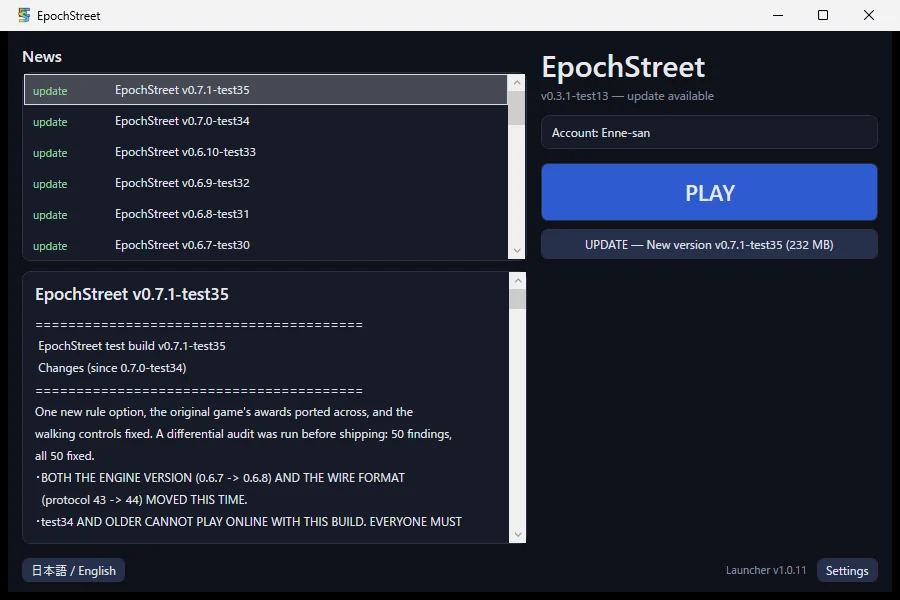
Availability: handed out to testers (not publicly released yet), for Windows and Linux. Extracting the game's own zip / tar.gz by hand still works if you prefer it.
1. What it does
| PLAY | Starts the installed game. An available update never makes you wait — you can keep playing the old version |
| INSTALL / UPDATE | Downloads and installs the newest build. No "unblock the zip" step |
| REPAIR | Reinstalls the same version when the game files are damaged |
| News | Update notes, maintenance and events. Offline, it shows the last feed it saw |
| Account | Creates the account used to publish boards and packs |
You can play with no network. When nothing answers, news comes from the cache, the update check is skipped silently, and PLAY still works. An account is not a condition of playing either.
2. Getting it, first run
- Download the archive from the link you were given
- Windows …
Launcher-<version>-win64.zip - Linux …
Launcher-<version>-linux64.tar.gz - Extract it and run what is inside — there is no installer
- Windows …
EpochStreet.Launcher.exe - Linux …
tar xzf …tar.gz, then./EpochStreet.Launcher(already executable) - If Windows says "Windows protected your PC", choose More info → Run anyway (the exe is not code-signed yet)
- The first run shows the account notice (next section)
- Press INSTALL; from then on the button says PLAY
Boxes instead of Japanese on Linux? Install your distribution's CJK font package (e.g.
fonts-noto-cjk). The button in the bottom-left corner also switches to English.
3. The account (only needed for publishing)
You need an account to publish boards, texture packs, sound packs and shop designs. Playing needs nothing.
- No e-mail, no password. It is an anonymous per-server account stored on this PC
- You choose the name (2–16 characters), on the screen that creates the account. Leave it blank to be named automatically. Names already taken, names claiming to be staff, and names made of markup characters are refused
- The first-run notice offers "create one" / "I have a transfer code" / "later". "Later" is fine — the game can create one when you try to publish
- A game started by the launcher publishes under that account
Your name is visible to other players. The identifier the operators use to tell accounts apart is a separate thing and is never shown to anyone, including you — so two similar-looking names cannot be confused on their side.
Moving to another PC — important
The account exists only on this PC. To move it:
- On the old PC, in the launcher, open Settings → Issue a transfer code (the game's "Online → Account" can issue one too — same code, same endpoint)
- On the new PC, in the launcher, choose "Use a transfer code" and enter it
The code is single-use, expires in minutes, and is shown only once. Write it down first.
If you lose the PC or its data without issuing a code first, the account cannot be recovered. (Both issuing and redeeming live in the launcher; the game's "Online → Account" can do the same.)
Only the original account can publish a new version of a board you already published, so issue a code before you move if you have uploads.
4. The window
The first start asks once whether to let the launcher run in the background and download by itself. Yes makes it resident at login and keeps your game and content current while you are not playing; No changes nothing at all. Either answer can be revisited in Settings.
- Status line — the installed version and whether an update exists
- Account row — "Account: <name>" or "none yet", with the create button
- PLAY / INSTALL / REPAIR — depends on the state
- Settings (bottom right)
- Channel —
releaseandtest. Their save data is separate, so switching never disturbs the other one - The install path
- Change the name — rename the account (once a day)
- Issue a transfer code — to move this PC's account to another one
- Use a transfer code — to receive a code issued on another PC
- Keep one older version — off by default. Turn it ON and an update holds on to the previous version's folder; left off, each swap deletes the old one (LD28)
- Delete old files — remove the old versions and leftovers that are on disk right now
- Keep running in the background — off by default. On, the launcher starts when you log in without showing a window, and closing the window leaves it in the tray (quit it from the tray menu)
- Download automatically — off by default, and it only runs while the row above is on too. While you are not playing it fetches game updates and newly published boards, texture packs and so on. What — and how much — it fetches is chosen in the game: Settings →Other → Auto-download (narrow it to categories; pick "Per pass" from Normal / More / A lot). The larger figures are meant for this background pass: nothing is waiting on them
- Per pass — the same amount, pickable here: "as set in the game", or Normal / More / A lot. The two places stay in step (changing it in either sets the same value). The steps come from the game, so the row waits until the game has been installed and run once
- Anything it fetched is written into News — a row the launcher wrote, chipped "auto"
- Open the log folder / Open the game data folder — for bug reports
5. Where files live
| What | Where |
|---|---|
| Launcher, its config and account | %LOCALAPPDATA%\EpochStreet\ (Linux: ~/.local/share/EpochStreet/) |
| The game, per version | %LOCALAPPDATA%\EpochStreet\game\<channel>\versions\ |
| Save data (product build) | %APPDATA%\EpochStreet\ (Linux: ~/.local/share/EpochStreet/) |
| Save data (test build) | %APPDATA%\TestEpochStreet\ (Linux: ~/.local/share/TestEpochStreet/) |
Updates never touch your saves — they live outside the install tree.
Uninstalling
At the bottom of the settings pane (the gear, bottom right) there is Uninstall.
- It asks whether to remove the game for the channel you are on. Only
%LOCALAPPDATA%\EpochStreet\game\<channel>\goes; your save data, settings and account stay, and so does any install on the other channel - Then it asks, as a separate question, whether to delete the save data too. The default is No; only if you answer Yes does
%APPDATA%\EpochStreet\(or%APPDATA%\TestEpochStreet\for the test build) get deleted. That cannot be undone
The game has to be closed first (it will say so otherwise). Afterwards PLAY turns back into INSTALL, so the same launcher can put the game back at any time.
To remove the launcher itself, delete %LOCALAPPDATA%\EpochStreet\ and the desktop shortcut if you made one — Epoch Street.url (made by the launcher since the display name gained its space; one made before that is named EpochStreet.url), or epochstreet-launcher.desktop on Linux. Your account lives there too, so issue a transfer code first if you plan to move to another PC.
6. Troubleshooting
| Symptom | What to do |
|---|---|
| The game will not start / ".NET assemblies not found" | The launcher should be offering REPAIR; press it to reinstall the same version |
| "Could not read the release info" | The server is unreachable. Playing is unaffected |
| "The update failed three times" | The launcher could not replace itself. Reinstall the launcher — the game and your saves are fine |
| A download keeps failing | Press it again. A file that fails verification is always discarded; nothing unverified is ever installed |
| "Uploading needs an account" | Use the account row's create button, or the game's "Online → Account" |
When reporting a problem, include the version shown at the bottom right of the title screen, and the contents of the log folder if relevant.